

Growth
Intercom charges $0.99 each time Fin closes a conversation. We read its pricing pages to show what makes the model sell, and what any team can copy.

Outcome-based pricing charges for the result a product delivers, and Intercom's Fin is the clearest live example in B2B software: $0.99 each time its AI agent closes a customer conversation, nothing when it fails. The price is the easy part. What makes it sell is everything the pricing page builds around that one number, and most of it can be copied by a team that has never touched AI support.
We read Fin's two pricing pages and its homepage this week. Here is what they do, piece by piece, and where they trip.
The pricing page opens on the price itself: "AI customer service for just $0.99 per outcome." Two short lines sit under it, "Only pay when Fin delivers" and "Set limits to control spending". A buyer gets the model, the promise and the safety rail before scrolling.
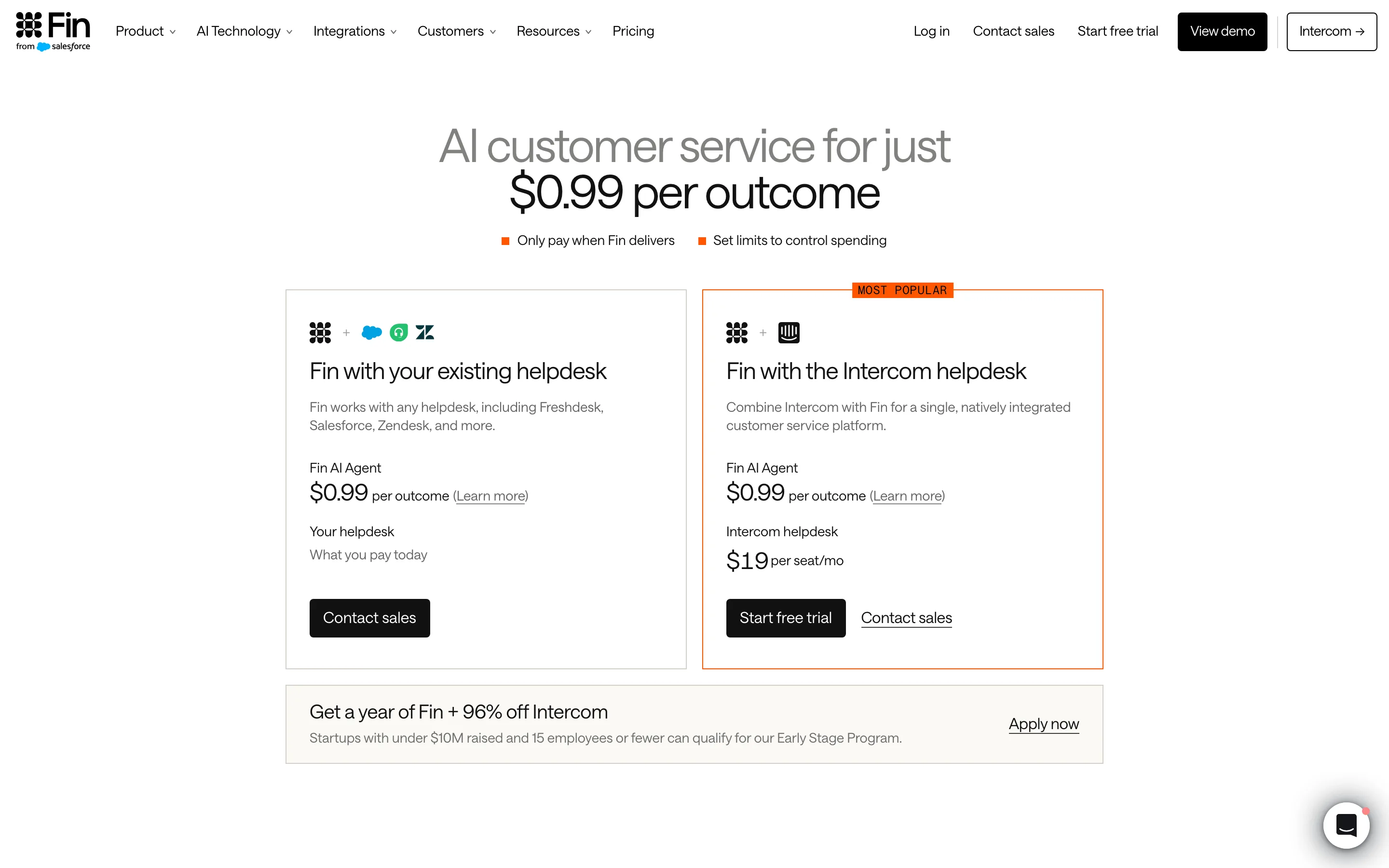
Compare that with a seat-based page, where the buyer has to count heads, pick a tier and guess at add-ons before seeing a total. Fin's headline answers the question a support lead is asking: what does it cost when it works.
Usage pricing lives or dies on the unit. If the buyer can't tell what counts, every invoice becomes an argument. Fin spells the unit out in its FAQ. An outcome counts when a customer confirms the issue is resolved, when they don't ask for more help after Fin answers, or when Fin completes a workflow, handoffs included. It's charged once per conversation, however many questions Fin answers.
Then come the edge cases, stated as guarantees. If Fin can't answer, fails an action, or the customer asks for a human at any point, the conversation is free. If it's reopened later, the outcome is refunded. That last line does a lot of work. It tells a skeptical buyer that "resolved" means resolved, and it hands Intercom's own finance team a rule they have to honor.
The second clause of the definition is the soft one. "They don't ask for more help" counts silence as success, and a customer who gives up in frustration also goes quiet. Intercom states it openly, which is the fair thing to do. A buyer still needs to measure it in their own data before trusting the bill.
Below the cards sits a cost estimate with three inputs: your helpdesk, monthly conversation volume and Fin's resolution rate. The rate slider defaults to 76%, marked "AVG", the same figure the homepage claims across "12,000+ businesses". At 200 conversations that gives 152 outcomes at $0.99, $150.48, plus one $19 seat "for your team to handle the other 48 conversations". Total: $169.48 a month.
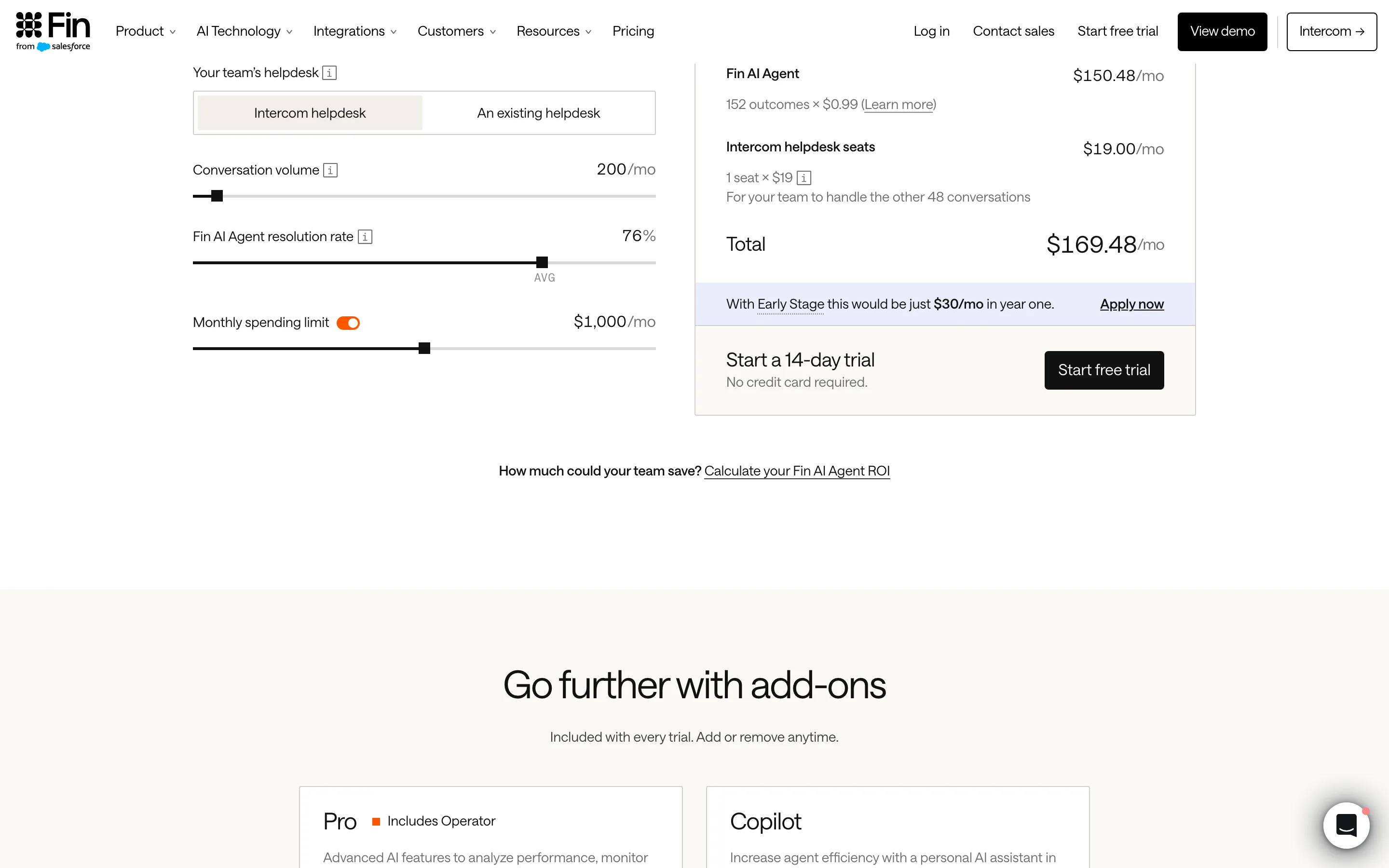
Three choices make this work. The default is the vendor's own average, labelled as such, so the buyer knows where the number comes from and can drag it down. The human seat stays in the total, which admits that Fin won't take every conversation. And a fourth input, a monthly spending limit set to $1,000, answers the question outcome pricing raises in every finance review: what if it works too well and the bill runs away.
If your product prices on results, build this block first. A calculator that shows the cost of the work your product won't do earns more trust than one that only shows savings.
The left-hand card on fin.ai/pricing is "Fin with your existing helpdesk". It names Freshdesk, Salesforce and Zendesk, prices Fin at the same $0.99, and lists the buyer's current helpdesk as "What you pay today". The FAQ adds a $49 monthly minimum, which includes 50 outcomes, and no seat or setup fees.
This is the growth move under the pricing. A support team running another helpdesk doesn't have to migrate to try Fin. It buys outcomes on top of the tool it already has, and Intercom gets a paying account inside a rival's installed base. Per-outcome pricing is what makes the card possible: there are no seats to sell, so there is nothing to replace.
The card has one catch. Its only button is "Contact sales", while the Intercom bundle beside it gets "Start free trial". The cheapest way in, with no migration and a $49 floor, is the one a buyer can't start alone. For a team that wants to test Fin on a slice of its queue before a call, that's the slowest path on the page.
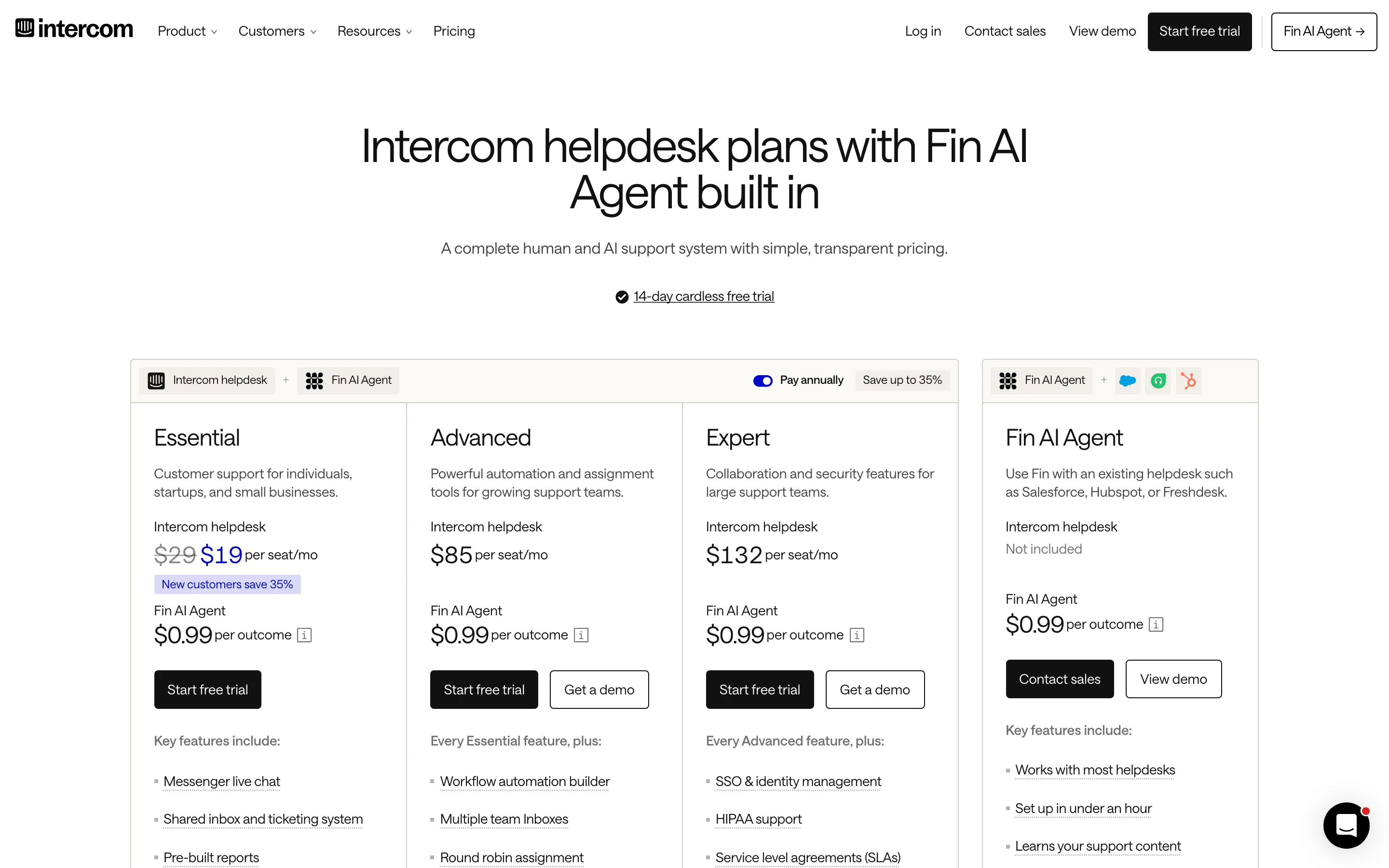
Fin now sells from fin.ai, with a logo that reads "Fin from Salesforce", and intercom.com/fin redirects there. Intercom's own pricing page still sells the bundle. Read side by side, the two pages drift:
None of this changes the model. It does give a careful buyer three reasons to email sales before trusting either page, and on a page whose whole pitch is "transparent pricing", every mismatch costs a little of that transparency. A single source for prices, read by both sites, fixes it.
Most teams reading this won't sell an AI agent. The pattern still carries to any product priced on what it delivers: booked meetings, qualified leads, processed invoices.
Pricing like this changes who signs up, so measure it like any funnel. Check how long the trial needs to show a real resolution rate, as we covered in picking a free trial length from activation data, and look at how PostHog's self-serve pricing page lets usage pricing close without a sales call.
If you want help turning your pricing page into a plan you can test, that's what we do.
Growth
Growth

Growth
One email with what we published that week on SEO, content, conversion, analytics and paid acquisition. Unsubscribe in one click. Privacy notice.