What Ahrefs' flat URLs mean for topic cluster tracking
Ahrefs keeps its blog URLs flat and puts the topic in a tag. Here is the setup that gives a topic cluster a number of its own when the URL cannot.

Ahrefs keeps every blog article on a flat URL and marks its topic with a tag, so topic cluster tracking on that blog has to live in a filter you build, never in the URL. Search Console will show you one article at a time and nothing will add them up. We looked at the Ahrefs blog to see how the structure works and what it costs you when you copy it.
Ahrefs marks its clusters with tags
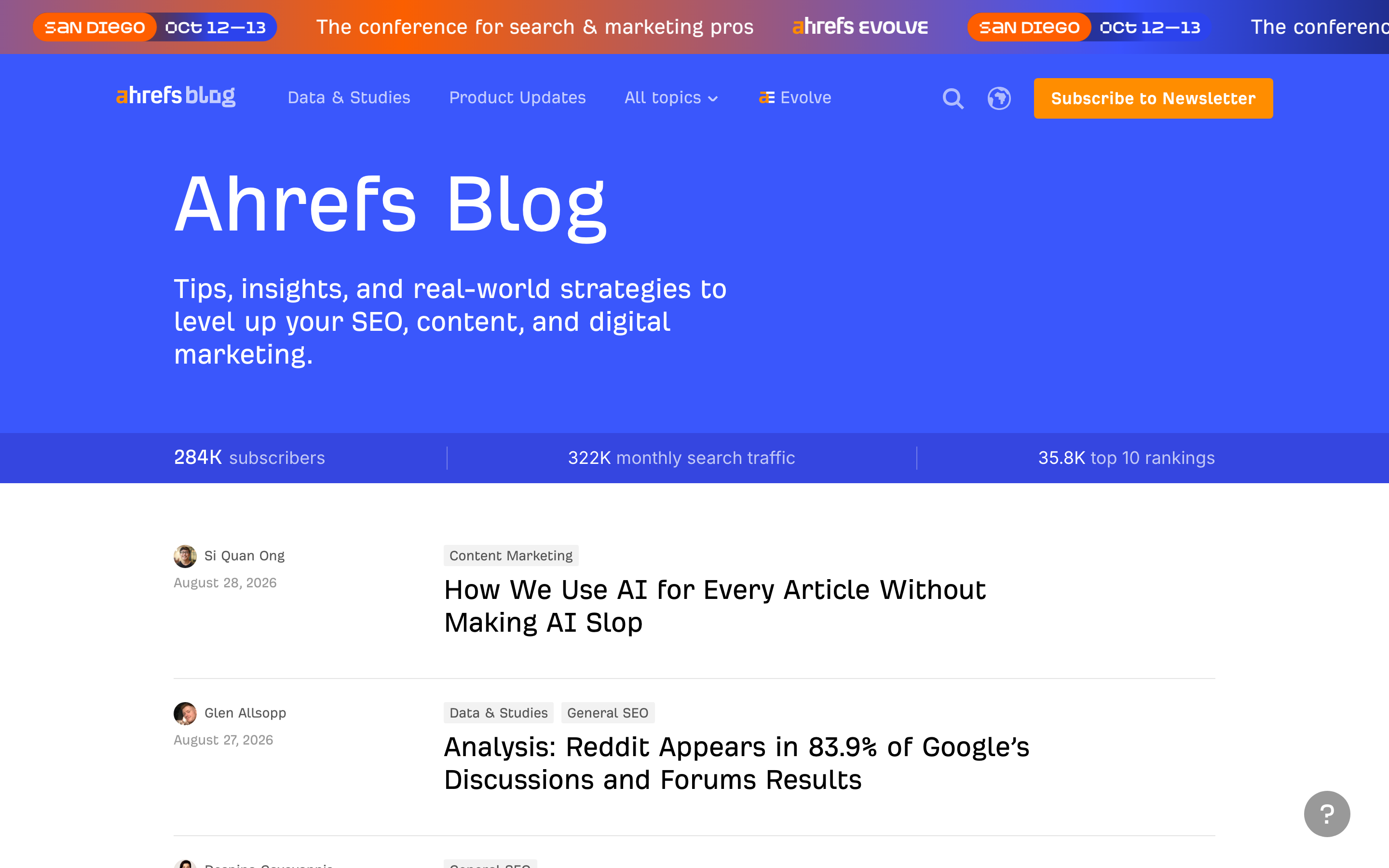
Every row on the blog index carries an author, a date, one or two category chips, and the headline. The 27 August 2026 study by Glen Allsopp sits under two chips at once, Data & Studies and General SEO. A folder can hold an article in one place. A tag can hold it in two, and on a blog running this long, plenty of articles belong to more than one topic.
The URLs stay short. /blog/long-tail-keywords/, /blog/what-are-keywords/. No topic segment, no date, no nesting. Slugs like that survive a recategorisation: Ahrefs can move an article between topics and nothing needs a redirect. That is a real benefit and it is why flat URLs keep winning the argument inside content teams.
The hub page is where the cluster becomes visible
Each topic gets a page at /blog/category/keyword-research/: an H1, two sentences of intro copy, an Editor’s picks block, then most recent articles and pagination. The intro is written for a reader, not for a crawler. It opens with “Keyword research is the foundation of SEO” and points at the resources below it.

Editor’s picks is doing the job a pillar page does on other sites. Three articles get promoted above the reverse-chronological list, which tells a reader and a crawler which pieces in this cluster carry the weight. The rest of the cluster reaches Google through that page and through the tag chips on every article.
Ahrefs publishes the page number and the site number
Open an article and a stat bar sits under the title: 4.5K organic traffic, 2.1K linking websites, labelled as article performance data from Ahrefs. The blog header carries the site-wide version, 284K subscribers, 322K monthly search traffic, 35.8K top 10 rankings. Both numbers are on the page, in public, on every visit.

The number in between is missing. Nowhere on the site can you see what the keyword research cluster does as a group. For a tool company publishing per-article proof, that is a fine choice. For you it is the number that answers the only question that matters after a quarter of publishing: did those six articles on one topic move together, or did one carry the other five?
How to track a topic cluster when the URLs are flat
Four steps, about an hour to set up, ten minutes a month to read.
1. Write the cluster down. One sheet, one row per URL, a cluster column next to it. The URL is not going to tell you which articles belong together, so the sheet becomes the source of truth. Keep it next to the content calendar so a new brief joins a named cluster on the day it is commissioned.
2. Filter Search Console with a regex. In the Performance report, New, Page, Custom (regex), Matches regex. Then paste your slugs: ^https://example\.com/blog/(long-tail-keywords|what-are-keywords|keyword-difficulty)/$. Search Console runs RE2, matching is case-insensitive by default, and the pattern caps at roughly 4,096 characters. A cluster of 40 or 50 slugs fits comfortably. A 300-page cluster will not, and that is your signal to fix the URLs.
3. Read three numbers, monthly. Cluster impressions, cluster clicks, and how many cluster URLs sit in the top 10. That third one matters because average position across a filtered set is weighted by impressions, so one big page can hide four that slipped. Ahrefs uses the same shape of metric on its own header with the top 10 rankings count.
4. Track the hub on its own. The category page competes for the head term while the articles chase the long tail. When the hub climbs and the spokes stay flat, your internal linking is working and the articles need depth. When the spokes climb and the hub does not, the hub is a list and needs an argument.
When a folder is worth the redirects
Starting a section from scratch, put the topic in the path. One filter on /keyword-research/ works forever with no list to maintain, which is the case we made when we looked at how Klaviyo’s URL folders make a topic cluster easy to track.
Moving an existing flat blog into folders costs a redirect on every article and a few weeks of wobble while Google reprocesses them. That bill grows with the archive, and past a few hundred posts the sheet plus regex approach is cheaper than the migration. The decision is the age of the blog, not the elegance of the URL. Either way the grouping has to exist somewhere before the first article ships, which is the part most teams skip when they build a topic cluster.
What to copy from Ahrefs
Copy the tag, the hub with real intro copy, the promoted picks, and the habit of publishing a performance number next to the work. Add the thing the structure leaves out: a written cluster list and a saved regex filter, so the cluster has a number of its own. Ahrefs has enough scale that the individual article numbers tell the story. At your size, the group number is the one that shows whether the strategy is working.
If you want a cluster view of your own content that reads clearly every month, that is the kind of setup we build. Tell us what you are publishing and we will map it.


